Mizzcraft
Official Minecraft Server of the Mizzcord
About Mizzcraft
Mizzcraft is a chill vanilla Minecraft server hosted by the Mizzcord, a community centered around the singer, filmaker, and ex-fishtank contestant Mizzy!
Java Edition
mizzcord.com
Bedrock Edition
Add to BedrockServer Map
Explore our world and discover builds!
Server MapJoin Our Discord
Chat with Mizzy fans and stay updated!
Join DiscordMod Installation Guide
Server is on Minecraft 26.2 (Fabric).
Download these:
- Java 25: Required for Minecraft 26.2 and the Iris installer. Use Java 25+ (21 is too old for this version).
- Iris Installer 3.3.0: Installs Fabric + Iris + Sodium for 26.2 (Iris 1.11.2, Sodium 0.9.1).
- BSL Classic v10.0: Beautiful vanilla-style shaders. (OPTIONAL — needs a decent GPU.)
- Simple Voice Chat 2.6.21+26.2: Proximity voice.
How to Install:
- Install Java, then run the Iris Installer. Choose Minecraft 26.2 and the Iris + Fabric option (not Quilt).
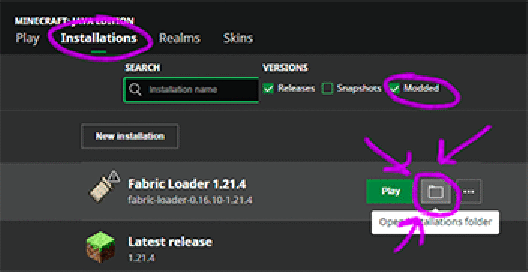
- Open the Minecraft Launcher → Installations → for the new Fabric/Iris profile click Folder / Open Installation Folder.
- Drop BSL_v10.0.zip into the shaderpacks folder (create the folder if needed).
- Drop voicechat-fabric-2.6.21+26.2.jar into the mods folder (alongside Iris/Sodium/Fabric API).
- Important: Launch with the Fabric / Iris 26.2 installation in the launcher dropdown — not vanilla.
Alternative Easy Installer
New to MC? Don't want to install mods manually?
- Download and install CurseForge App
- Open the app and click "Minecraft" as your active game.
- Search Mizzcraft, install the pack built for 26.2.
- Click play! Server list should include mizzcord.com.
- (Shaders are off by default — enable BSL in video settings / shader packs if you want them.)